시작
현재 사이트는 기본적인 부분만 구현되어 있기 때문에 여러 부분에서 수정과 추가가 필요하다. 다만, Lighthouse 측정 결과, SSG로 구현된 블로그이기 때문에 점수는 좋게 나왔다.

개선점에 있어 추천 항목은 다음과 같다.
- 사용하지 않는 자바스크립트 줄이기 사용하지 않는 자바스크립트를 줄이고 스크립트가 필요할 때까지 로딩을 지연시켜 네트워크 활동에 소비되는 바이트를 감소시킬 수 있다.
- 자바스크립트 줄이기 자바스크립트 파일을 축소하면 페이로드 크기와 스크립트 파싱 시간을 감소시킬 수 있다.
웹 접근성 측면에서는 html 태그에 lang 속성이 없다는 문제로 인해 100점이 나오지 않은 것 같고, 검색 엔진 최적화 측면에서는 메타 태그를 제대로 설정하지 않았기에 발생하는 문제로 보인다.
따라서 우선 메타 태그를 설정하기로 했다.
Next.js에서 검색 엔진 최적화하기
검색 엔진을 최적화하는 방법 중 대표적인 방법으로는 메타 태그를 설정하는 것이다. Next.js에는 메타 태그를 설정하는 두 가지 방법이 있다.
-
모든 페이지에서 공통으로 활용할 메타 태그를
_document.tsx에서 설정하기import { Html, Head, Main, NextScript } from "next/document"; export default function Document() { return ( <Html> <Head /> <body> <Main /> <NextScript /> </body> </Html> ); } -
각 페이지마다 메타 태그를
next/head를 통해 설정하기import Head from "next/head"; function IndexPage() { return ( <div> <Head> <title>My page title</title> <meta name="viewport" content="initial-scale=1.0, width=device-width" /> </Head> <p>Hello world!</p> </div> ); } export default IndexPage;
블로그의 경우 블로그 글 제목을 title로 활용해야 하기 때문에 각 페이지마다 title 태그를 설정하고, 나머지 메타 태그의 경우는 공통으로 설정하는 방향으로 가닥을 잡았다.
공통 메타 태그 설정하기
우선 다양한 메타 태그를 _document.tsx에 작성했다.
import { Html, Head, Main, NextScript } from "next/document";

const Document = () => (
  <Html lang="ko">
    <Head>
      <meta charSet="UTF-8" />
      <meta name="author" content="Hyoungmin Lee" />
      <meta name="keywords" content="키워드들" />
      <meta name="subject" content="주제" />
      <meta
        name="description"
        content="프론트엔드 개발자 이형민의 개발 블로그, 미니로그⭐입니다."
      />
      <meta http-equiv="Content-Script-Type" content="Text/javascript" />
      <meta name="location" content="Seoul, Republic of Korea" />
      <meta name="robots" content="ALL" />
      <meta name="date" content="2022-10-19T18:00:00+09:00" />
      <meta name="viewport" content="width=device-width, initial-scale=1.0" />
      <meta http-equiv="reply-to" content="이메일" />
      <meta http-equiv="email" content="이메일" />
      <meta http-equiv="copyright" content="Copyright (c) 2022 Hyoungmin Lee" />
      <meta http-equiv="publisher" content="Hyoungmin Lee" />
      <meta http-equiv="Other Agent" content="Hyoungmin Lee" />
      <meta http-equiv="Generator" content="Visual Studio Code" />
      <meta property="og:type" content="website" />
      <meta property="og:url" content="https://minilog-dev.vercel.app/" />
      <meta property="og:title" content="미니로그 miniLog" />
      <meta property="og:image" content="public/main.svg" />
      <meta
        property="og:description"
        content="프론트엔드 개발자 이형민의 개발 블로그, 미니로그⭐입니다."
      />
      <meta property="og:site_name" content="미니로그" />
      <meta property="og:locale" content="ko_KR" />
      <meta property="og:image:width" content="1200" />
      <meta property="og:image:height" content="630" />
    </Head>
    <body>
      <Main />
      <NextScript />
    </body>
  </Html>
);

export default Document;
Warning - Viewport meta tags should not be used in _document.js's <Head>
다만 뷰포트에 관련된 메타 태그는 _app.tsx에 삽입해야 한다.(참고, 이슈)
// pages/_app.js

import Head from "next/head";

function MyApp({ Component, pageProps }) {
  return (
    <>
      <Head>
        <meta name="viewport" content="width=device-width, initial-scale=1.0" />
      </Head>
      <Component {...pageProps} />
    </>
  );
}

export default MyApp;
각 페이지별로 Title 다르게 설정하기
라이브러리에 존재하는 getPageTitle 함수를 활용해 title을 가져오고, next/head의 Head를 활용해 설정할 수 있다.
// pages/blog/[slug].tsx

import Head from "next/head";
import { getPageTitle } from "notion-utils";

type PostProps = {
  blockMap: ExtendedRecordMap;
};

const Post = ({ blockMap }: PostProps) => {
  const title = getPageTitle(blockMap);

  return (
    <>
      <Head>
        <title>{title}</title>
      </Head>
      <PostDetail data={blockMap} />
    </>
  );
};
Font Optimization
Next.js에서의 Font Optimization은 _document.tsx에 Font를 추가할 수 있다. 즉, 빌드 동안 Font를 인라인화하여 Font를 최적화할 수 있도록 도와준다. 즉, Font를 가져오기 위해 추가적인 네트워크 요청을 하는 것을 제거하여 FCP(First Contentful Paint) 및 LCP(Large Contentful Paint)를 개선할 수 있다.
// pages/_document.tsx

import { Html, Head, Main, NextScript } from "next/document";

const Document = () => (
  <Html>
    <Head>
      <link
        rel="stylesheet"
        as="style"
        crossOrigin="anonymous"
        href="https://cdn.jsdelivr.net/gh/orioncactus/pretendard@v1.3.6/dist/web/static/pretendard.css"
      />
    </Head>
    <body>
      <Main />
      <NextScript />
    </body>
  </Html>
);

export default Document;
SWC
Next.js 어플리케이션이 더 빠르게 빌드되고, 로컬에서도 즉각적인 피드백을 받을 수 있도록 SWC를 기반으로 구축된 새로운 Rust 컴파일러는 번들링과 컴파일 작업을 최적화하여 로컬에서 최대 3배 더 빠르게 업데이트하고, 배포를 위해 최대 5배 빠르게 빌드하게끔 도와준다.
Next.js 12 버전부터 기본적으로 SWC 컴파일러가 바벨을 대체하도록 설정되어 있고, SWC가 코드 경량화도 하게 하려면 다음과 같이 설정해주어야 한다.
// next.config.js

module.exports = {
  swcMinify: true,
};
따라서 이를 활용하면, 더 효율적으로 작업할 수 있고, 적용하기 전에 블로그 상세 페이지의 빌드 시간이 53209ms 걸리는 것보다 11929ms로 약 5배 빠르게 빌드할 수 있는 것을 볼 수 있다.
// SWC 적용 전

Route (pages)                                            Size     First Load JS
┌ ○ /                                                         413 B          80.5 kB
├   /_app                                                       0 B            80.1 kB
├ ○ /404                                                  194 B          80.3 kB
├ ● /blog (1402 ms)                              686 B          80.8 kB
└ ● /blog/[slug] **(53209 ms)**             306 kB          386 kB
    ├ /blog/react-routing-without-library (4800 ms)
    ├ /blog/preonboarding-assignment-sparkpet (4248 ms)
    ├ /blog/minilog-ssg-retrospective (4160 ms)
    ├ /blog/nextjs-boilerplate (3916 ms)
    ├ /blog/minilog-notion-api-retrospective (3739 ms)
    ├ /blog/minilog-layout-retrospective (3722 ms)
    ├ /blog/react-state (3545 ms)
    └ [+12 more paths] (avg 2090 ms)
+ First Load JS shared by all                            95.2 kB
  ├ chunks/framework-4556c45dd113b893.js                 45.2 kB
  ├ chunks/main-a75cf611e061d8f8.js                      31 kB
  ├ chunks/pages/_app-60371f9d05a2fffe.js                2.99 kB
  ├ chunks/webpack-5752944655d749a0.js                   840 B
  └ css/e1ef920b9d1a5cd5.css                             15 kB

○  (Static)  automatically rendered as static HTML (uses no initial props)
●  (SSG)     automatically generated as static HTML + JSON (uses getStaticProps)
// SWC 적용 후
Route (pages) Size First Load JS
┌ ○ / 420 B 81.1 kB
├ /_app 0 B 80.7 kB
├ ○ /404 182 B 80.9 kB
├ ● /blog (516 ms) 675 B 81.4 kB
└ ● /blog/[slug] **(11929 ms)** 310 kB 390 kB
├ /blog/minilog-notion-api-retrospective (3897 ms)
├ /blog/collectors-retrospective (1142 ms)
├ /blog/nextjs-boilerplate (944 ms)
├ /blog/minilog-layout-retrospective (693 ms)
├ /blog/minilog-ssg-retrospective (576 ms)
├ /blog/react-routing-without-library (465 ms)
├ /blog/react-state (431 ms)
└ [+12 more paths] (avg 315 ms)
+ First Load JS shared by all 95.7 kB
├ chunks/framework-7751730b10fa0f74.js 45.5 kB
├ chunks/main-4b87c0cfc1760944.js 31.3 kB
├ chunks/pages/_app-e729efae81f72542.js 3.09 kB
├ chunks/webpack-59c5c889f52620d6.js 819 B
└ css/e1ef920b9d1a5cd5.css 15 kB
○ (Static) automatically rendered as static HTML (uses no initial props)
● (SSG) automatically generated as static HTML + JSON (uses getStaticProps)압축
Next.js는 기본적으로 렌더링된 컨텐츠와 정적 파일을 압축하기 위한 gzip 압축을 제공하고 있다. 즉, 기본값으로 gzip 압축이 설정되어 있기 때문에 설정에서 이를 비활성화하지 않는 한 렌더링된 컨텐츠와 정적 파일은 압축되게 된다.
// next.config.js

module.exports = {
  compress: true, // 기본값
};
차이를 확인해보기 위해 gzip 압축을 비활성화하고 빌드를 해봤다.
Route (pages)                                              Size     First Load JS
┌ ○ /                                                          420 B          80.8 kB
├   /_app                                                        0 B            80.4 kB
├ ○ /404                                                   182 B          80.6 kB
├ ● /blog (1285 ms)                                675 B            81 kB
└ ● /blog/[slug] (68346 ms)                 310 kB          390 kB
    ├ /blog/stale-while-revalidate (24387 ms)
    ├ /blog/minilog-ssg-retrospective (4554 ms)
    ├ /blog/minilog-notion-api-retrospective (4013 ms)
    ├ /blog/minilog-layout-retrospective (4008 ms)
    ├ /blog/preonboarding-assignment-thingsflow (3833 ms)
    ├ /blog/nextjs-boilerplate (3608 ms)
    ├ /blog/react-state (3317 ms)
    └ [+12 more paths] (avg 1719 ms)
+ First Load JS shared by all                              95.4 kB
  ├ chunks/framework-7751730b10fa0f74.js                   45.5 kB
  ├ chunks/main-e7a7892cb0edc024.js                        31 kB
  ├ chunks/pages/_app-e729efae81f72542.js                  3.09 kB
  ├ chunks/webpack-59c5c889f52620d6.js                     819 B
  └ css/e1ef920b9d1a5cd5.css                               15 kB

○  (Static)  automatically rendered as static HTML (uses no initial props)
●  (SSG)     automatically generated as static HTML + JSON (uses getStaticProps)
동일한 작업이 68346ms가 걸리는 것을 확인할 수 있다. 즉, SWC를 적용하기 이전보다 많은 시간이 소요된다.
Dynamic Import 적용
Import Cost 익스텐션을 활용해 외부 라이브러리의 사이즈를 확인할 수 있는데, 상세 페이지에서 가져오는 외부 라이브러리가 특정 수준을 넘어서는 것으로 파악됐다.
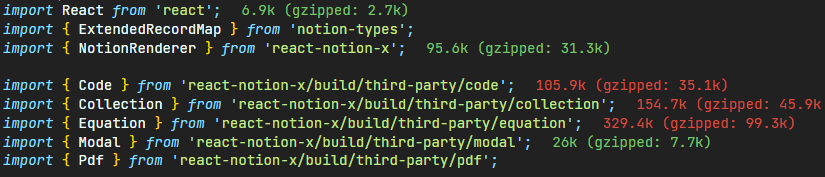
이들은 NotionRenderer의 코드 박스, 수식 등을 활용하게 해주는 라이브러리로, 사용해야만 하기 때문에 제거할 수는 없고, 다른 방법을 찾기로 했다.
Next.js에는 import로 가져와서 사용하는 외부 라이브러리와 next/dynamic을 사용하는 React 구성 요소를 느리게 로드하는 기능이 있다. 이를 활용하면 페이지를 렌더링할 때 필요로 하는 JavaScript 코드를 감소시켜 초기 성능을 높일 수 있다.
// pages/blog/[slug].tsx

import dynamic from "next/dynamic";

const PostDetail = dynamic(() => import("components/post/PostDetail"));
// dynamic import 이전
Route (pages) Size First Load JS
┌ ○ / 420 B 80.9 kB
├ /_app 0 B 80.4 kB
├ ○ /404 182 B 80.6 kB
├ ● /blog (1427 ms) 675 B 81.1 kB
└ ● /blog/[slug] (52537 ms) 310 kB **390 kB**
├ /blog/react-routing-without-library (6437 ms)
├ /blog/stale-while-revalidate (5380 ms)
├ /blog/nextjs-boilerplate (4416 ms)
├ /blog/minilog-notion-api-retrospective (4153 ms)
├ /blog/minilog-ssg-retrospective (4058 ms)
├ /blog/minilog-layout-retrospective (3559 ms)
├ /blog/react-state (3455 ms)
└ [+12 more paths] (avg 1757 ms)
+ First Load JS shared by all 95.5 kB
├ chunks/framework-7751730b10fa0f74.js 45.5 kB
├ chunks/main-e7a7892cb0edc024.js 31 kB
├ chunks/pages/_app-9769be5c1ec4d337.js 3.14 kB
├ chunks/webpack-59c5c889f52620d6.js 819 B
└ css/e1ef920b9d1a5cd5.css 15 kB
○ (Static) automatically rendered as static HTML (uses no initial props)
● (SSG) automatically generated as static HTML + JSON (uses getStaticProps)// dynamic import 이후
Route (pages) Size First Load JS
┌ ○ / 420 B 81.7 kB
├ /_app 0 B 81.3 kB
├ ○ /404 182 B 81.5 kB
├ ● /blog (1079 ms) 675 B 82 kB
└ ● /blog/[slug] (52361 ms) 7.47 kB **88.8 kB**
├ /blog/minilog-layout-retrospective (5717 ms)
├ /blog/react-state (4512 ms)
├ /blog/minilog-ssg-retrospective (4033 ms)
├ /blog/react-hooks (3935 ms)
├ /blog/minilog-notion-api-retrospective (3611 ms)
├ /blog/preonboarding-assignment-unknown (3497 ms)
├ /blog/stale-while-revalidate (3426 ms)
└ [+12 more paths] (avg 1969 ms)
+ First Load JS shared by all 96.4 kB
├ chunks/framework-7751730b10fa0f74.js 45.5 kB
├ chunks/main-e7a7892cb0edc024.js 31 kB
├ chunks/pages/_app-9769be5c1ec4d337.js 3.14 kB
├ chunks/webpack-7e9c97d225a6a50d.js 1.72 kB
└ css/e1ef920b9d1a5cd5.css 15 kB
○ (Static) automatically rendered as static HTML (uses no initial props)
● (SSG) automatically generated as static HTML + JSON (uses getStaticProps)First Load JS의 크기가 약 5배(390kB → 88.8kB) 줄어든 것을 확인할 수 있다.
빌드 시 발생한 이슈
빌드 시간을 확인하는 중 Warning 하나와 Error 하나를 확인했다.
Warning - Large Page Data
info  - Collecting page data
[   =] info  - Generating static pages (7/23)

Warning: data for page "/blog/[slug]" (path "/blog/react-routing-without-library") is 168 kB which exceeds the threshold of 128 kB, this amount of data can reduce performance.

See more info here: https://nextjs.org/docs/messages/large-page-data

missing block 35caccaf-ec46-4bfb-a5b8-4b54a7453cba

Warning: data for page "/blog/[slug]" (path "/blog/minilog-ssg-retrospective") is 165 kB which exceeds the threshold of 128 kB, this amount of data can reduce performance.

See more info here: https://nextjs.org/docs/messages/large-page-data
Next.js는 관련된 링크를 친절히 제공하기 때문에 해당 링크를 열어봤다.
해당 경고는 페이지 중 하나가 대량의 페이지 데이터, 128kB 이상의 데이터를 포함하고 있기 때문에 발생하는 경고라고 나온다. 페이지가 hydrate되기 전에 브라우저가 페이지 데이터에 대해 구문 분석을 해야하므로, 성능에 부정적 영향을 미칠 수 있다고 한다.
기준치 이상의 데이터를 제한하거나 블로그 글을 두 개로 나누는 등의 해결책이 존재는 하지만, 해당 노션 페이지에 데모 영상 등이 포함되어 있고, 여러 코드를 설명하고 있기 때문에 발생한 경고이기 때문에 크리티컬한 문제가 발생하지 않는 한 우선 그대로 두는 것이 낫다고 생각했다.
NotionAPI getSignedfileUrls error
[==  ] info  - Generating static pages (22/23)

NotionAPI getSignedfileUrls error
RequestError: connect ETIMEDOUT 104.18.6.183:443
    at ClientRequest.<anonymous> (C:\Users\hyoun\Programming\minilog\node_modules\got\dist\source\core\index.js:970:111)
    at Object.onceWrapper (node:events:642:26)
    at ClientRequest.emit (node:events:539:35)
    at ClientRequest.origin.emit (C:\Users\hyoun\Programming\minilog\node_modules\@szmarczak\http-timer\dist\source\index.js:43:20)
    at TLSSocket.socketErrorListener (node:_http_client:454:9)
    at TLSSocket.emit (node:events:527:28)
    at emitErrorNT (node:internal/streams/destroy:157:8)
    at emitErrorCloseNT (node:internal/streams/destroy:122:3)
    at processTicksAndRejections (node:internal/process/task_queues:83:21)
    at TCPConnectWrap.afterConnect [as oncomplete] (node:net:1187:16) {
  code: 'ETIMEDOUT',
  timings: {
    start: 1666182100140,
    socket: 1666182100140,
    lookup: 1666182100140,
    connect: undefined,
    secureConnect: undefined,
    upload: undefined,
    response: undefined,
    end: undefined,
    error: 1666182121183,
    abort: undefined,
    phases: {
      wait: 0,
      dns: 0,
      tcp: undefined,
      tls: undefined,
      request: undefined,
      firstByte: undefined,
      download: undefined,
      total: 21043
    }
  }
}
유사한 에러를 겪는 이슈를 확인해본 결과, notion-client의 버전 문제이므로 업데이트하라고 하는데, 이미 최신 버전이 설치되어 있기 때문에 이는 해결책이 아닌 듯 하다.
추가적으로 팔로업하면서 처리해야겠다.
마무리
결국 모두 100점으로 점수를 올려 조금 더 나은 웹 사이트를 만들 수 있었다! 모두 100점으로 만들면 폭죽도 터트려준다는걸 이제 알게되었다!